2. Active Directory Tasks - Powershell
2.5 Disabling User and Computer Accounts
Disable User Account
we could use the Disable-ADAccount cmdlet to disable a user.
Disable-ADAccount -Identity Guest
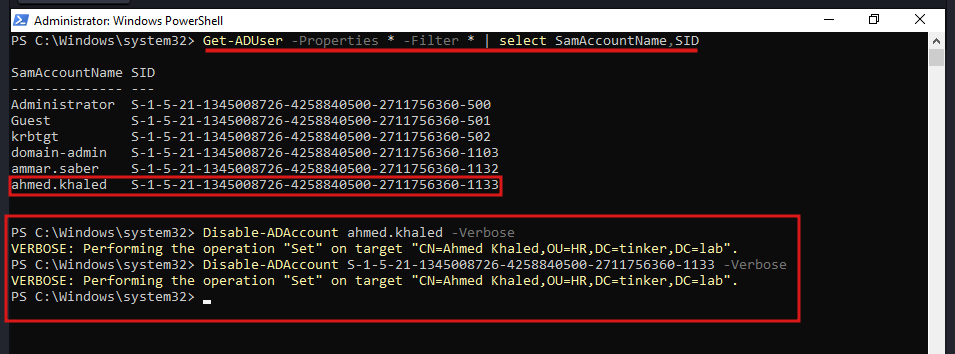
-Identityparameter takes different inputs. it could be the distinguished name, Security Identifier (SID), Globally Unique Identifier (GUID) or Security Account Manager (SAM) account name.
Here is how to get the SID and SAM account:
Get-ADUser -Properties * -Filter * | select SamAccountName,SID
Disable Computer Account
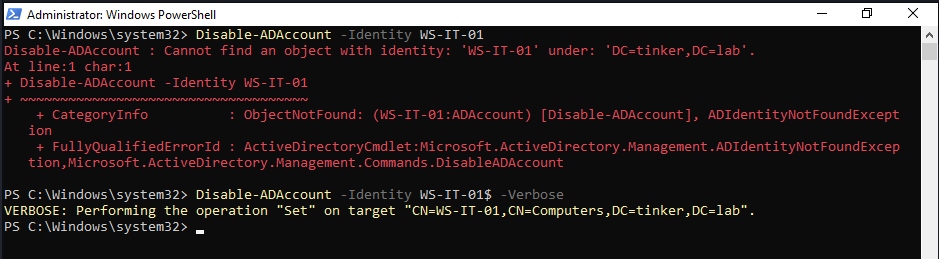
the same cmdlet applies on computer accounts, but make sure you add a $ at the end of the name, otherwise you’ll get an error!
Disable-ADAccount -Identity WS-IT-01$
Disable Bulk of Computers
you can also disable bulk of computers from a list in txt file:
$PClist = Get-Content "C:\scripts\Computer.txt" # Specify the path to the computer list.
Foreach($pc in $PClist)
{
Disable-ADAccount -Identity "$pc"
Get-ADComputer -Identity "$pc" | Move-ADObject -TargetPath "OU=Disabled Computers,DC=tinker,DC=lab"
}
- first line reads the content of the Computer.txt file.
- loop through every line in the file.
- Disable every computer in the list.
- Move these Computers to an OU called “Disabled Computers”.